How do I register as a CARE Pro?
You can register by going through our Assessment or by taking our Training Course.
ASSESSMENT are for those qualified nurses and therapists with at least a year of working experiencea and possess a valid license / diploma / degree / certificate in their related fields. This also apply to caregivers with at least 2 years of working experiences as a nurse maid in hospitals or home care.
You will be assess in both communication skills and practical skills in a scenario-based environment by our professional nurses. After you pass the assessment, you will then be registered as a CARE Pro.
TRAINING COURSE is free-for-all. After completing a comprehensive course with us, you will be registered as a CARE Pro automatically.
What is the CARE App?
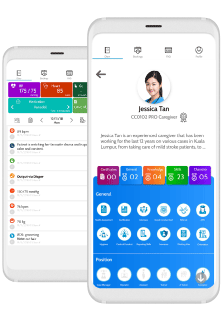
The CARE App is our proprietary technology platform that assist and support our CARE Pros from assessing, managing and reporting patient’s health condition through recovery and rehabilitation process.
How do I install the CARE App into my phone?
Step 1
If you are using Android, open Play Store.
If you are using IOS, open App Store.
Step 2
Tap on the Search Box, type ``JomCARE`` and install.
How do I register into the CARE App?
Step 1
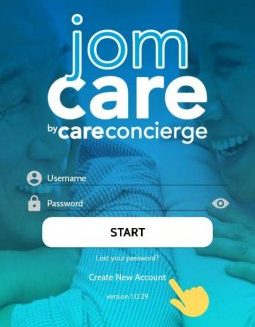
Open the app. On the title screen, at the bottom, tap on ``Create New Account``.
Step 2
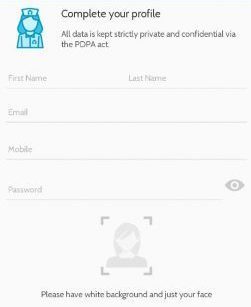
Fill up all the necessary information accordingly. In the photo section, take a photo of yourself (passport size) with a white background. Then tap, Next.
Step 3
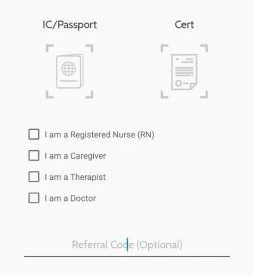
On this page, you are required to upload a photo of your IC / Passport and your certificate. Also, tick which position is applicable to you. Then, tap Next.
Step 4
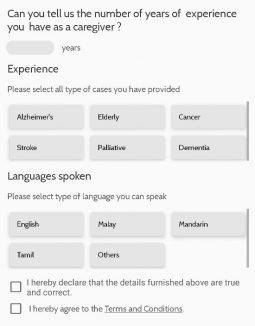
From the top, type in how many years of experience you have in your professional field. Next, highlight all the applicable information related to your experiences and languages / dialect you know. Tick on the boxes, saying that you agree to the terms and condition presented in this app.
Step 5
Congratulations! Welcome to JomCARE.
I am qualified to take the Assessment. What should I do next?
After the registration process, you will be asked to choose a date for your assessment. You can also Whatsapp or call our representative at 60109205480 or 60182013363.
I am interested to take the Training Course. How do I register myself?
After the registration process, it will take you to the training calendar and choose the most convenient date available. For more information about the Training Course, contact our representative at 60109205480 or 60182013363.
How do I apply for a case a job?
After you passed your assessment or completed our training course, your CARE App account will be activated for you to start getting jobs.
Open your CARE App, from CAREER tab, you will see “New Cases”. This section will show you all the available cases we have in CARE Concierge. You can choose to communication with our CARE Managers by tapping on Whatsapp button or “I’m Interested” button.
How will I know if I am chosen to become the caregiver for a certain case?
First, a CARE Manager will give you a call and ask for your qualifications and experiences as a caregiver. This will allow them to match your knowledge and skills base on the client’s need.
Second, after the confirmation from you and the client, they will set a proper date and time for you to start working.
Lastly, when all decisions are in place, you can open your CARE App, go to “CAREER” then check your case info in “NEXT APPOINTMENT”.
What can I see in the ``Next Appointment`` section?
You will see the following information of your active case;
- Name of the client
- Address
- Contact number
- Date / Time
How do I use the CARE App to report my daily activities?
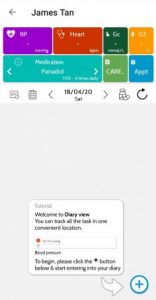
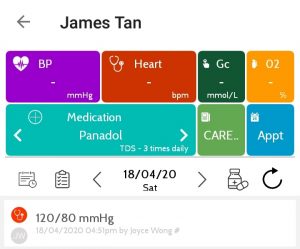
Open your CARE App, tap on “CAREER” then locate “Next Appointment”. From therer, tap on “Health Journal”. It will transfer you to your patient’s profile shown below.
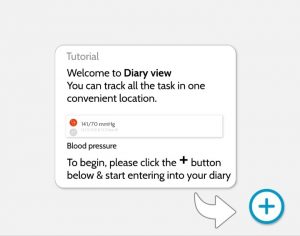
Locate the plus button at the lower right corner of the screen.
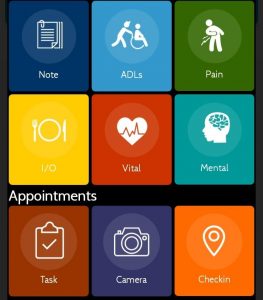
The “Diary” will pop up and you will see the following tiles.
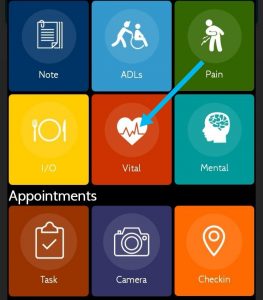
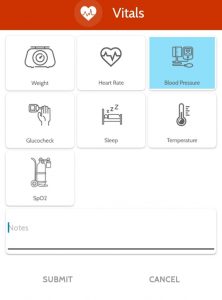
Choose a proper tile to record your activity. For example, if you are going to report the blood pressure reading of your patient using the CARE App, follow the steps below.
Step 2. Choose “Blood Pressure”.
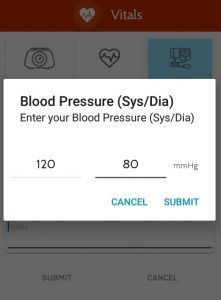
Step 3. Key-in your reading, then press “Submit” button.
The report will show at the patient’s profile.
I forgot to write my report in the CARE App. What should I do?
You need to inform your CARE Manager and provide a proper report as to why you did not report back. Please note that the company has a strict rule that if you do not report in the app on that same day, you will NOT get paid on that day.
I forgot my password. What should I do?
Please call our JomCARE representative to retrieve your password.
When are the salary dates?
Salaries are paid on the 5th and 20th of each month. If this date falls on a weekend or public holiday, the salaries are paid on the last working day before the 15th or the 30th.
How do I get paid?
This is ONLY done via online transfer. You need to provide a Malaysian bank account to your CARE Manager after accepting a case.
I am sorry, I cannot go to my case due to some personal emergency. What should I do?
For emergency or sick reasons, you need to inform your CARE Manager 24 hours beforehand. Present a proper letter or medical certificate (MC) to your CARE Manager because if not, the company has the right to blacklist you and prevent you from getting a case again.
Am I oblige to do house chores?
Caregivers are solely focus in taking care of the patient. Means that anything that is connected or related to the patient safety and well-being is your responsibility.
What does it mean by LIVE-IN and DAYCARE case?
DayCARE means you work for several hours in a day, go back home and come back the following day. The maximum working hours for DayCARE package is 12. Your CARE Manager will provide full details of the package before you take a case.
Live-In (Stay-In) means you stay with the patient in their house. The maximum working hours in a day is 10 and the remaining hours is monitoring. This is different for every patient depending on their health condition and needs.